Every deliverability signal, one list, worst first
Laneful Radar pulls Gmail Postmaster, Outlook SNDS, DMARC reports and your own bounces and complaints into a single view of every sending domain and IP — each marked healthy, watch or critical, with the evidence behind it.
Laneful Radar pulls Gmail Postmaster, Outlook SNDS, DMARC reports and your own bounces and complaints into a single view of every sending domain and IP — each marked healthy, watch or critical, with the evidence behind it.
Deliverability data has never been scarce. Gmail reports on your domains, Microsoft reports on your IPs, every receiver that honors DMARC sends you an aggregate report, and your own bounce and complaint logs grow with every send. The trouble is that each of these lives in a different place, speaks about a different thing — a domain here, an IP there — and arrives on its own schedule. With one domain, you can keep up. With a dozen, or a few thousand, nobody opens every console every morning, and problems get found by the customer who asks why their mail stopped arriving.
Laneful Radar reads all of it for you and answers one question: where is mail failing right now?
The problem isn't missing data
Most senders already have more signals than they can read. What they don't have is those signals side by side.
That matters because deliverability problems rarely show up in just one place. A small rise in Gmail's spam rate, an IP that Outlook has turned yellow and a climb in soft bounces at one corporate mail provider can all be the same problem seen from three angles. Looked at separately, each one seems minor and easy to put off. Looked at together, they're a domain that needs attention this week.
Every tool you have reports on its own slice. None of them tells you which of your domains to look at first. That's the gap Radar fills.
One list, sorted by what needs you
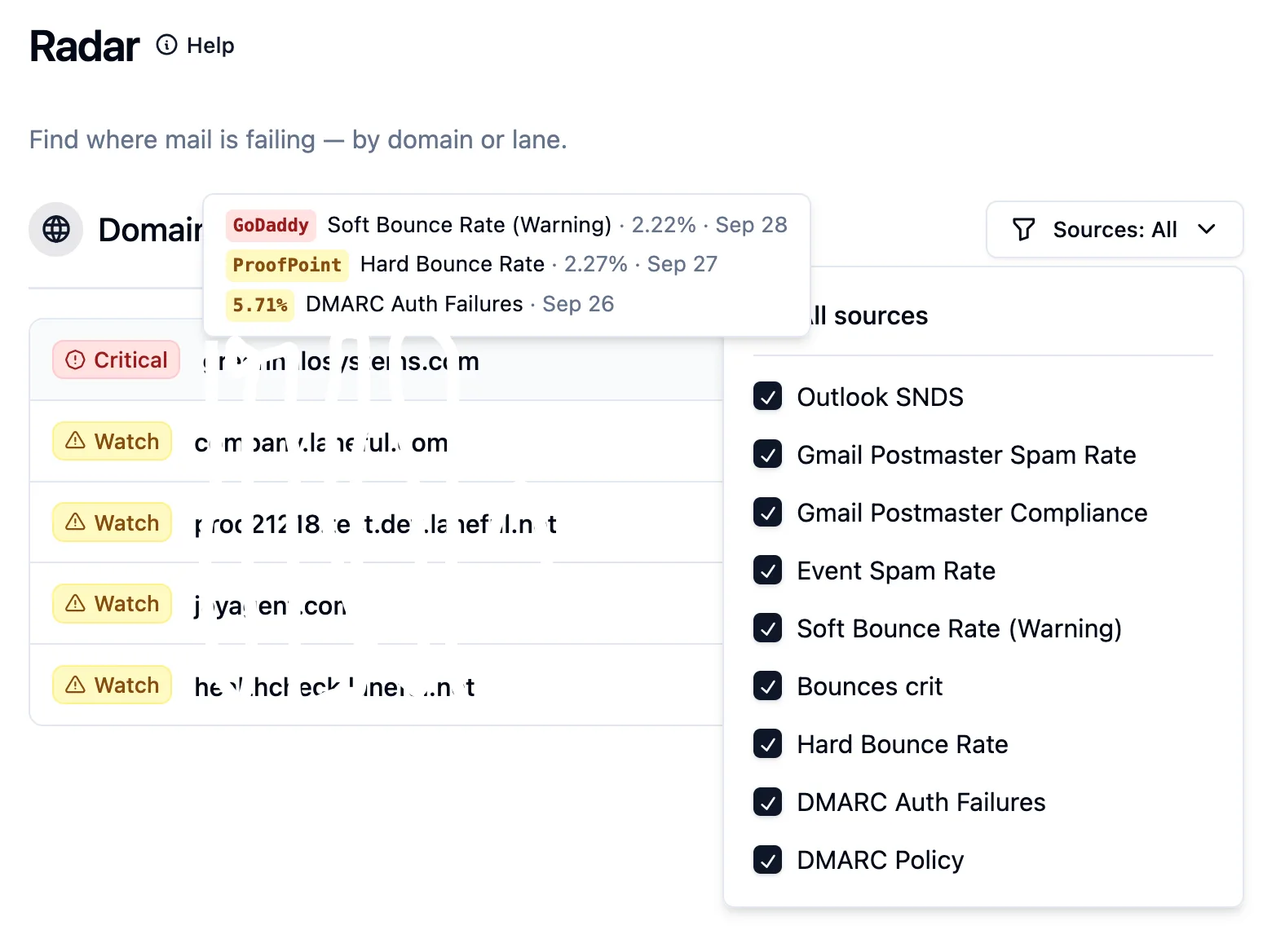
Radar lists every sending domain in your organization with one badge: healthy, watch or critical. The list is sorted worst first, then by volume, so the top of the page is effectively your to-do list. The domain at the top in the screenshot is critical. The ones below it are worth a look, but aren't urgent.
Hover a flagged domain and Radar shows what put it there. In the example above, that's a soft-bounce warning at GoDaddy, an elevated hard-bounce rate at Proofpoint and a run of DMARC authentication failures, each on a different day. Three separate problems from three separate sources, collected on one row, before you've clicked anything.
Next to each domain, a strip of daily dots shows how the verdict changed over time. That makes it easy to tell whether a problem started yesterday, has been there all week, or has already cleared up. You choose the window, anywhere from the last day to the last week.
A second column does the same for your sending IPs, using Microsoft's reputation data. Each IP is labelled with the lanes that send through it, so a bad IP points you straight to the traffic it affects.
What feeds it
Radar brings together the data sources we've covered in earlier posts, plus what Laneful sees from your own sending:
- Gmail Postmaster Tools — the daily user-reported spam rate for each domain, and Google's bulk-sender compliance verdicts.
- Outlook SNDS — Microsoft's view of each sending IP, including its filtering verdict, complaints and spam-trap hits, carried over to the domains that sent through that IP.
- DMARC — authentication failures reported by receivers, plus a check for domains that have sat on a monitor-only policy longer than a rollout should take.
- Your own sending — complaints, soft and hard bounces, and outright blocks, broken down by mailbox provider.
The Sources filter narrows the list to one kind of signal at a time. Use it to see which domains Gmail is unhappy with, or which ones are getting blocked, without the rest in the way.
Watch before critical
Most deliverability problems give warning before they turn into outages. It might be a slow rise in soft bounces at one provider, a trickle of complaints, or a DMARC policy that was left on p=none after setup and never raised. None of these stop your mail today. All of them make it more likely to stop next month.
The watch tier is there so these show up while they're still cheap to fix. Critical is saved for evidence strong enough to act on the same day, such as receivers blocking your mail on policy grounds or Google flagging a domain as non-compliant.
Radar is also careful about how much weight it gives thin data. A single complaint against a handful of messages is noted, but it won't turn a domain red on its own. When a domain is critical, it means something.
Evidence, not a score
Many deliverability tools boil your reputation down to a single number. A number tells you that something changed. It doesn't tell you what to do about it.
Radar gives you the reason. Open any flagged domain and you get a "Why" list showing which source raised the flag, at which mailbox provider, on which day, and the value behind it. Next to that are a per-provider breakdown of your sending and the bounce messages receivers actually sent back. A Gmail compliance failure names the requirement that failed. A bounce spike shows you the receiver's own words.
From there, one click takes you to the domain or lane itself. The path from "something is wrong" to "this is what to change" is a couple of clicks, not an afternoon of logging into portals and matching dates across spreadsheets.
Built for fleets
Radar works the same whether you send from one domain or thousands. It only shows domains where it actually has evidence, so a large fleet of healthy domains doesn't bury the three that need you. For agencies, platforms and multi-brand senders, that's the difference between monitoring every domain and hoping the important ones are fine.
Available now
Radar is live for every Laneful organization. There's nothing to connect and no portal to log into. Open Radar in the dashboard and the list is already sorted.