Gmail deliverability data is now in the Laneful dashboard
Google Postmaster Tools reports for every sending domain — bulk-sender compliance verdicts, user-reported spam rate, delivery errors, reject reasons and temporary failures, day by day — are now visible in the dashboard, with the spam rate also readable over the Organization API. Available to every Laneful organization, with no Google account and no domain verification required.
Google Postmaster Tools reports for every sending domain — bulk-sender compliance verdicts, user-reported spam rate, delivery errors, reject reasons and temporary failures, day by day — are now visible in the dashboard, with the spam rate also readable over the Organization API. Available to every Laneful organization, with no Google account and no domain verification required.
Gmail is the single largest destination for most senders' mail, and Google keeps a daily record of how each sending domain behaves there: whether it passes the bulk-sender requirements, what share of recipients marked it as spam, how much of it was rejected outright and why, and how much was deferred. That record has always been available to senders, in principle. In practice, most of them never look at it.
Laneful now shows this data per domain. Every organization sees its Gmail Postmaster numbers in the dashboard, next to everything else it already knows about its sending.
Why Postmaster Tools goes unread
Unlike Microsoft's SNDS, Google's Postmaster Tools is open to any sender. The friction is elsewhere. You need a Google account, you need to add a DNS TXT record for every domain you want to watch, and then you need to remember to open a separate console and click through each domain individually. Pulling the data programmatically means setting up a Google Cloud project and an OAuth flow first.
None of that is hard. It's just one more thing, in a place nobody visits day to day, so the check happens after a problem is noticed rather than before. The data that would have warned you sits unread until the campaign that needed the warning has already gone out.
Laneful already handles the domains you send from, so we read the Postmaster reports for them and put the results where you already are. No Google account, no TXT records, no second login.
Why this is worth tracking
Since February 2024, Google enforces a set of requirements on anyone sending meaningful volume to Gmail: SPF and DKIM authentication, a DMARC policy that aligns with the From domain, valid forward and reverse DNS on the sending IPs, TLS on the connection, a one-click unsubscribe header that is honored within two days, and a user-reported spam rate kept under 0.3% — ideally under 0.1%.
The important word is enforces. Falling short of any of these doesn't produce a warning email. It produces temporary failures, then rejections, then mail that arrives and goes straight to spam. By the time it shows up in your open rates, Google has already been telling you for days. Postmaster Tools is where it tells you.
The individual numbers each answer a different question:
Spam rate is the leading indicator. It's the share of mail that reached the inbox and was then marked as spam by the recipient, which makes it a direct measurement of whether people wanted what you sent. It moves before anything else does, and Google's thresholds are explicit: stay under 0.1% and you're fine, cross 0.3% and enforcement follows.
Delivery errors are the share of attempted mail Gmail didn't accept. Reject reasons break that down by cause — low IP reputation, low domain reputation, IP on a blocklist, spammy content, a bad PTR record, a bad attachment — and the breakdown matters because each cause has a different fix. Low domain reputation is a list-quality problem. A bad PTR record is a five-minute DNS change. Treating them the same wastes the week.
Temporary failures are the quiet stage before rejects. Gmail defers mail it's unsure about — "suspected spam" — or mail arriving faster than it wants to take it — "rate limit exceeded." Deferred mail is usually retried and eventually delivered, so it rarely looks like a problem on your side. A rising temp-failure rate is Gmail's way of saying it's losing confidence, before it stops accepting.
A few caveats that are Google's rather than ours. Reports are daily and typically lag a day behind, so the data is never real-time. A domain sending too little mail to Gmail on a given day produces no report for that day at all. And Postmaster Tools reports on the domain, not the IP — it's the complement to SNDS, not a replacement for it.
In the dashboard
Each domain gets a Postmaster History panel with two tabs.
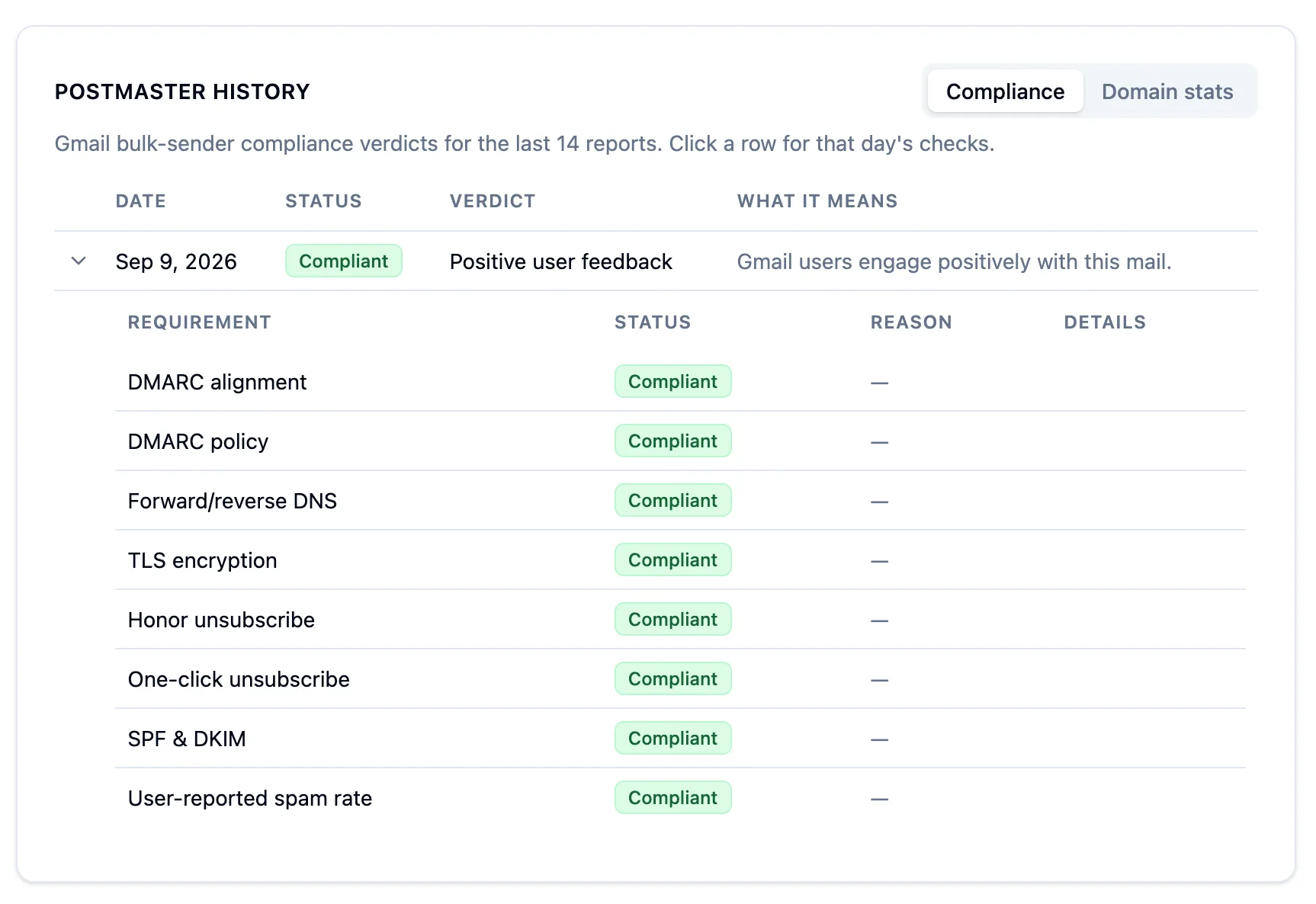
Compliance shows the last 14 days of bulk-sender verdicts, one row per report. Each row carries the overall status, Google's verdict on the day — "Positive user feedback," for instance — and a plain-English line on what that verdict means. Click a row and it opens into the eight individual checks Google runs: DMARC alignment, DMARC policy, forward and reverse DNS, TLS, honor-unsubscribe, one-click unsubscribe, SPF and DKIM, and user-reported spam rate. When a check fails, the reason and details Google gives sit right next to it, so a non-compliant day tells you which requirement to fix instead of just that something is wrong.
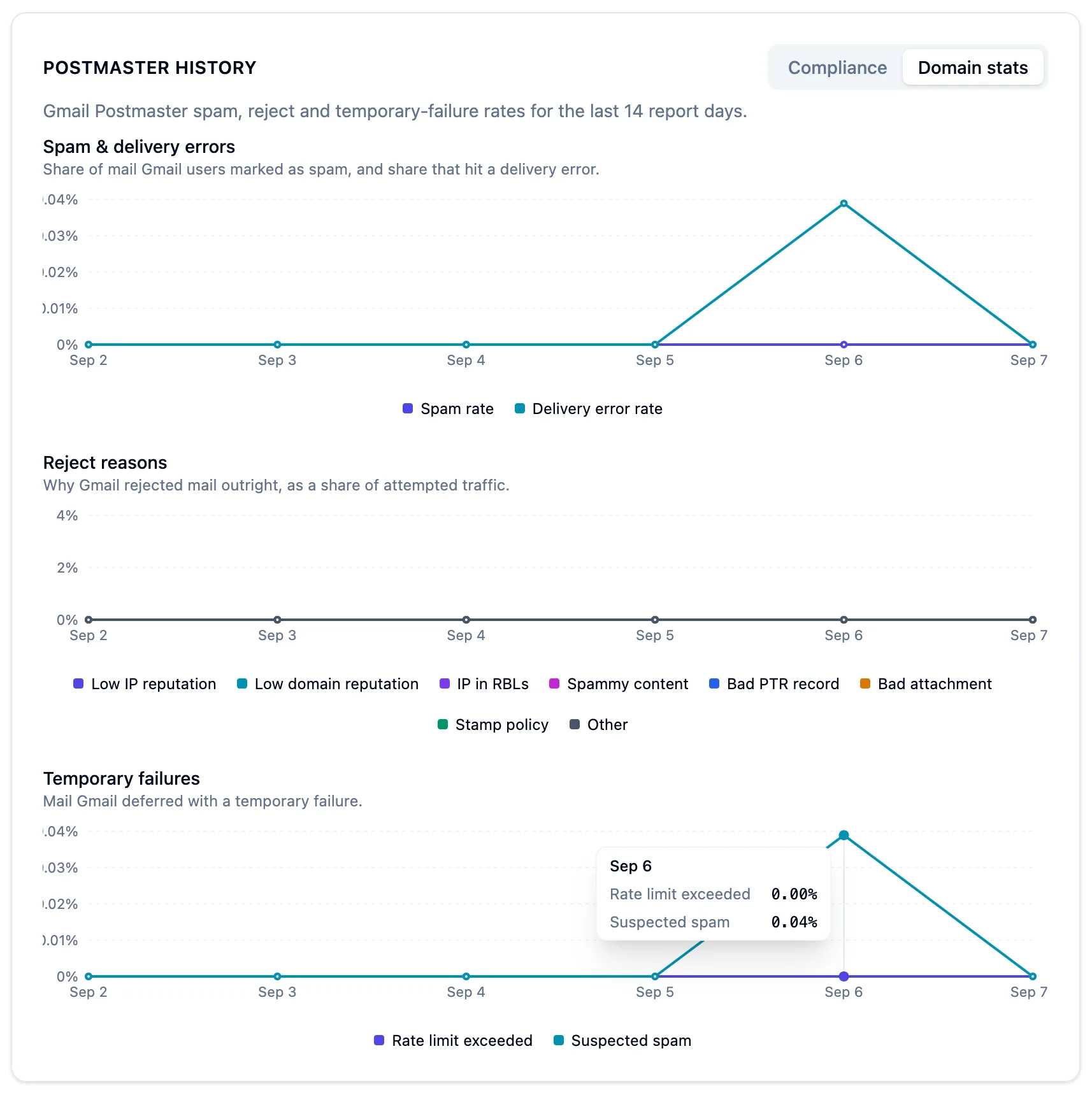
Domain stats charts the rates over the same 14 report days. Spam rate and delivery error rate share the first chart. Reject reasons are plotted per cause on the second, so a spike in "low domain reputation" is visually distinct from a spike in "bad PTR record." Temporary failures are split between rate-limit and suspected-spam on the third. Hover any day for the exact figures.
The panel reads left to right the way an investigation does: a compliant day with a temp-failure bump is worth a look at what was sent, and a non-compliant day tells you exactly which check to open first.
Also over the API
The daily spam rate per domain is also available from the Organization API, so you can alert when it crosses 0.1% or join it against your own send data instead of waiting for someone to open a dashboard. Details are in the Google Postmaster API reference.
History that keeps accumulating
Postmaster Tools shows a limited window of history, and it only covers domains you verified before the data was recorded. Laneful archives each day's reports as they arrive, so the record for your domains keeps growing from the day you start sending through us, and last quarter's spam rate is still there when you want to compare it against this one.
Available now
Postmaster reporting is live for every Laneful organization. There is nothing to enable, no Google account to create and no DNS record to add — open a domain in the dashboard and its Gmail data is there.