Outlook deliverability data is now in the dashboard and API
Laneful now surfaces Microsoft SNDS data for your Outlook.com, Hotmail and Live.com traffic, giving every organization filter verdicts, complaint rates and daily traffic counts per sending IP without registering IP ranges or maintaining a Microsoft login. The dashboard triages IPs as Critical or Watch, the API lets you alert and chart trends, and Laneful archives reports past Microsoft's 90-day window.

Microsoft SNDS reports for every sending IP — filter verdicts, complaint rates, day by day — are now visible in the dashboard and readable over the Organization API. Available to every Laneful organization, with no setup and no Microsoft account required.
If you send mail to Outlook.com, Hotmail or Live.com addresses, Microsoft has been keeping a daily record of how that mail behaved: how many messages it accepted, what share of them it filtered into junk, how many recipients hit the "junk" button. Until now, most senders had no practical way to read it.
Starting today, that record is in Laneful. Every organization sees its Outlook.com deliverability data in the dashboard, and can pull the same data over the API.
Why Outlook has been a blind spot
Gmail gives senders Postmaster Tools. Microsoft's equivalent is Smart Network Data Services, or SNDS — and it is genuinely good data.
SNDS is built for the owner of an IP range, not the sender using it. Access requires proving that ownership through an automated flow: you request a range, Microsoft emails an authorization link to an address associated with that range's registration, and you click it. The process is deliberately, entirely automatic — as Microsoft puts it, the system "is designed to be fully automatic for signup and maintenance and cannot accommodate manual modifications."
That works if you own the IPs. If you send through a provider, you don't. The authorization mail goes to the provider, not to you, and there is no supported way to ask for an exception. The result is that the senders with the most to learn from SNDS are the ones structurally locked out of it.
Laneful owns and has already verified its sending IP ranges with Microsoft. So we read the reports and pass through the ones that describe your traffic. You get the data for the IPs you actually send on, without registering anything, proving anything, or maintaining a separate Microsoft login.
What the data actually tells you
SNDS reports one row per IP per day. Six fields matter:
filter_result — GREEN, YELLOW or RED. This is the field people most often misread. It is not an abstract reputation score; it is the share of that IP's mail that Outlook's filters sent to junk. Green means under 10%. Yellow means between 10% and 90%. Red means over 90% — effectively, your mail is arriving and going straight to the junk folder.
complaint_rate — the percentage of recipients who marked your mail as junk, reported to three decimal places. 0.1 means 0.1%. This is the leading indicator; complaint rate climbs before the filter verdict flips.
rcpt_commands, data_commands and message_recipients — Outlook's own count of your traffic at the SMTP level. These are worth more than they look. Compared against what Laneful shows you sending, a gap between rcpt_commands and data_commands means Microsoft is refusing mail at the connection, before the message body is ever transmitted — a failure mode that doesn't always look like a bounce on your side.
A few honest caveats, all of them Microsoft's rather than ours. SNDS aggregates the previous day's traffic in a batch that starts around midnight PST, so the data moves in 24-hour steps and is never real-time. And an IP sending under roughly 100 messages a day to Outlook may not produce a report at all — there isn't enough traffic to say anything statistically useful about it.
In the dashboard
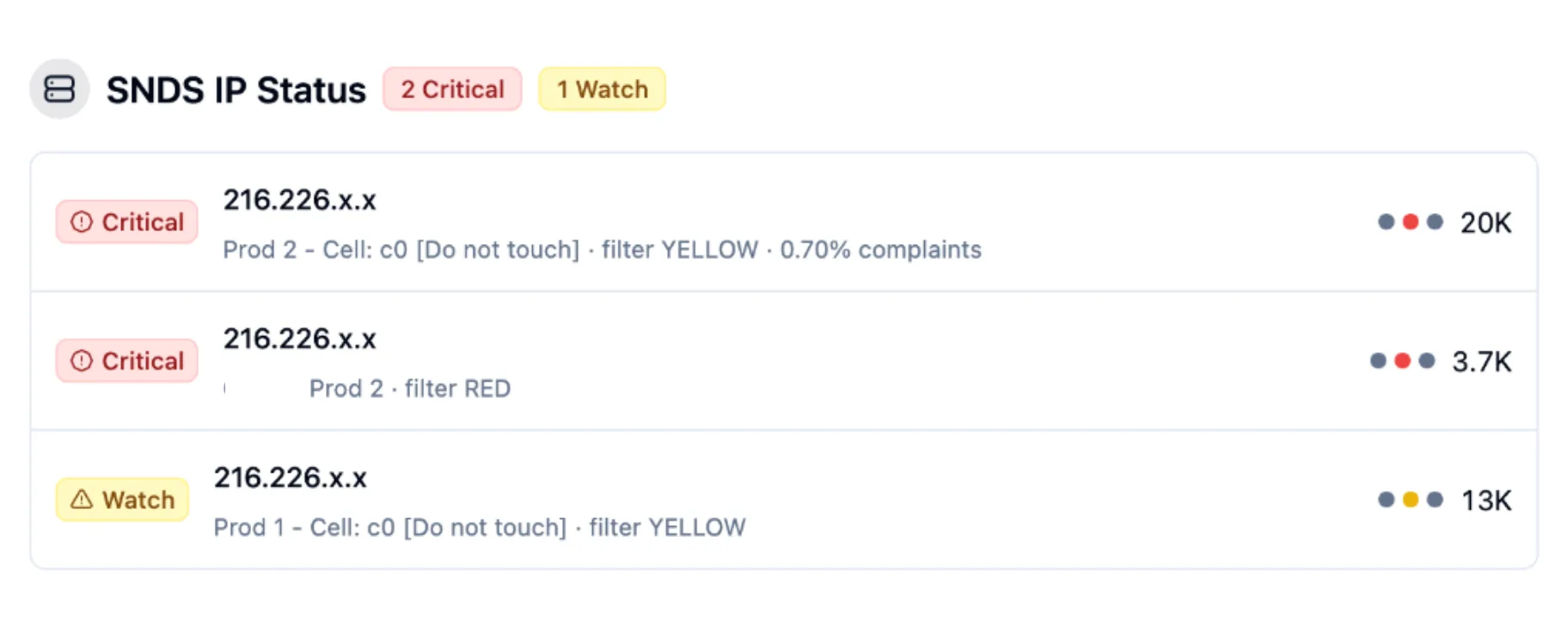
The dashboard triages for you. Each IP is classified Critical or Watch based on its filter verdict and complaint rate, and the counts sit in the panel header, so a red IP announces itself rather than waiting to be found.
Each row shows which lane the IP serves, the current filter verdict, the complaint rate when there is one, and the recent-days trend as a row of dots — one per day, colored by verdict — next to the volume Outlook recorded. A yellow dot appearing in an otherwise clean run is the moment to look at what you sent that day.
Over the API
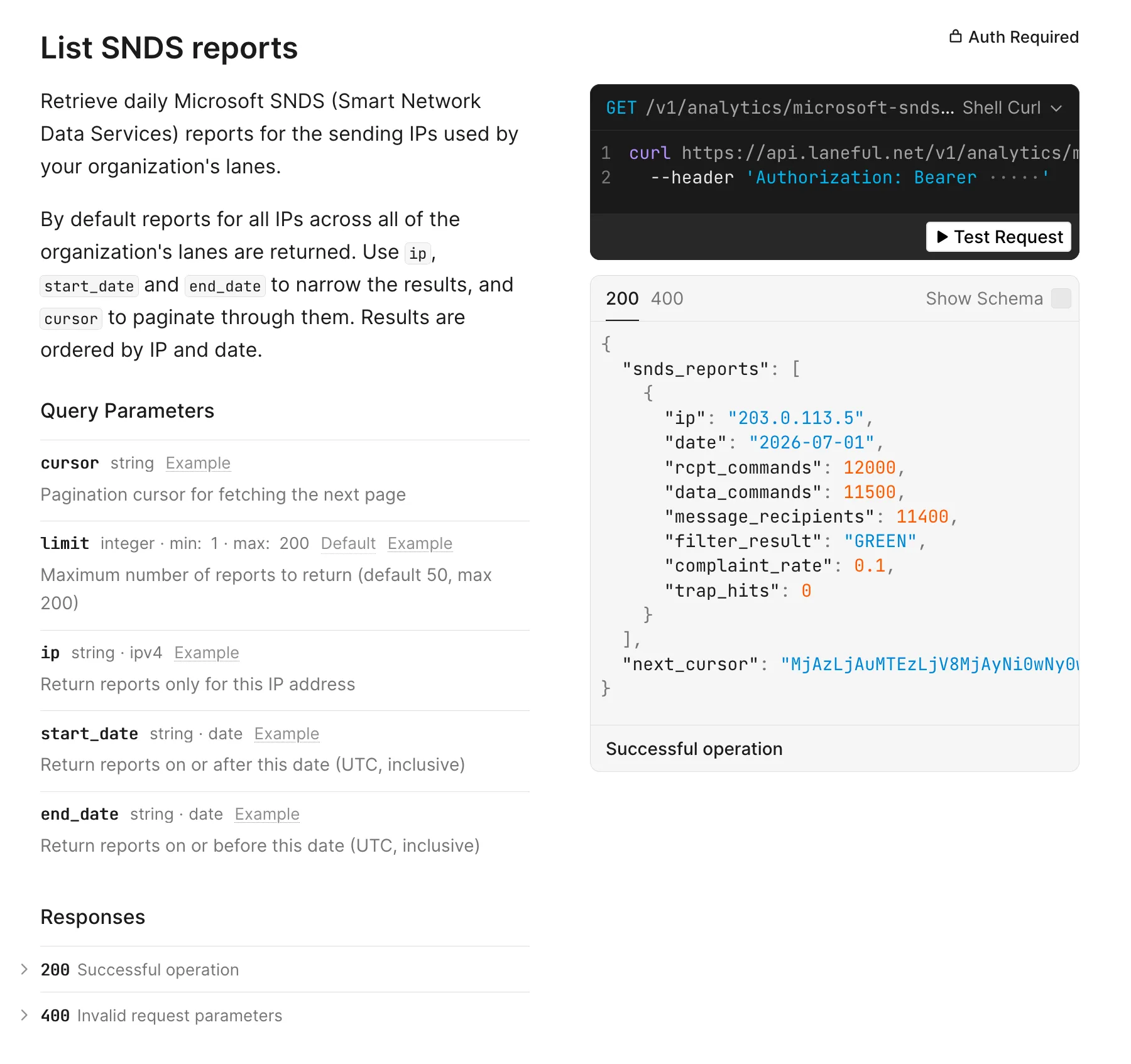
The same reports are available from the Organization API:
curl 'https://api.laneful.net/v1/analytics/microsoft-snds/reports?start_date=2026-07-01&end_date=2026-07-14' \
  --header 'Authorization: Bearer YOUR_API_TOKEN'
{
  "snds_reports": [
    {
      "ip": "203.0.113.5",
      "date": "2026-07-01",
      "rcpt_commands": 12000,
      "data_commands": 11500,
      "message_recipients": 11400,
      "filter_result": "GREEN",
      "complaint_rate": 0.1
    }
  ],
  "next_cursor": "MjAzLjAuMTEzLjV8MjAyNi0wNy0wMQ=="
}
By default you get reports for every IP across all of your organization's lanes, ordered by IP and date. Narrow them with ip, start_date and end_date, set limit between 1 and 200 (the default is 50), and page through with the cursor returned as next_cursor. Full details are in the Microsoft SNDS API reference.
Having this as an API rather than only a screen is what makes it usable in practice. You can alert on a verdict changing from GREEN to YELLOW instead of waiting for someone to open a dashboard. You can join SNDS days against your own campaign calendar and see which send drove a complaint spike. And during IP warm-up, you can chart Microsoft's view of your ramp next to your own send volume, which is the only way to tell "we sent less" apart from "they accepted less."
History that outlives Microsoft's 90 days
Microsoft keeps SNDS data available for 90 days, then it's gone. That window is short for the questions people actually ask about deliverability, which tend to be seasonal: what happened during last year's peak, whether this quarter's complaint rate is genuinely worse than the last one, whether a list segment has been quietly degrading for six months.
Laneful archives the daily reports as they arrive, so your history keeps going after Microsoft's copy expires. Both the dashboard and the API read from that archive.
Available now
SNDS reporting is live for every Laneful organization. There is nothing to enable, no Microsoft account to create and no IP range to register — open the dashboard and the data for your sending IPs is there, with the same reports available over the API.