Test where your email lands before you send it to anyone
The Laneful deliverability tester sends your actual message to real mailboxes at Gmail, iCloud, Yahoo, Zoho and other major providers, then reports where each copy landed — inbox, spam, or a tab — and how long it took to get there.
The Laneful deliverability tester sends your actual message to real mailboxes at Gmail, iCloud, Yahoo, Zoho and other major providers, then reports where each copy landed — inbox, spam, or a tab — and how long it took to get there.
Every deliverability tool that exists today tells you about the past. Postmaster Tools, SNDS and DMARC reports all describe mail you have already sent, aggregated over a day or more, and by the time a number moves the damage is done. None of them can answer the question you actually have at 4pm on a Thursday with a campaign queued: if I send this right now, where does it go?
Laneful now answers that directly. Run a delivery test, and the message you are about to send goes to a panel of real mailboxes at the major providers. A few seconds later you can see, per provider and per mailbox, whether it reached the inbox or the spam folder.
How a test works
You give the tester the message you plan to send: the same sending domain, the same from-address, the same subject and body, the same links and images. This matters. Filters judge the whole message, and a test built from a placeholder tells you about the placeholder, not your campaign.
Laneful sends that message to a set of seed mailboxes it maintains at each provider — several at Gmail, several at iCloud, several at Yahoo, several at Zoho, and so on. These are ordinary consumer accounts that receive mail like anyone else's. As each copy arrives, Laneful checks which folder it was filed into and records the time between the send and the arrival.
Multiple mailboxes per provider is deliberate. A single Yahoo address landing in spam could be that one account's history. Two out of three landing in spam is a pattern.
Reading the results
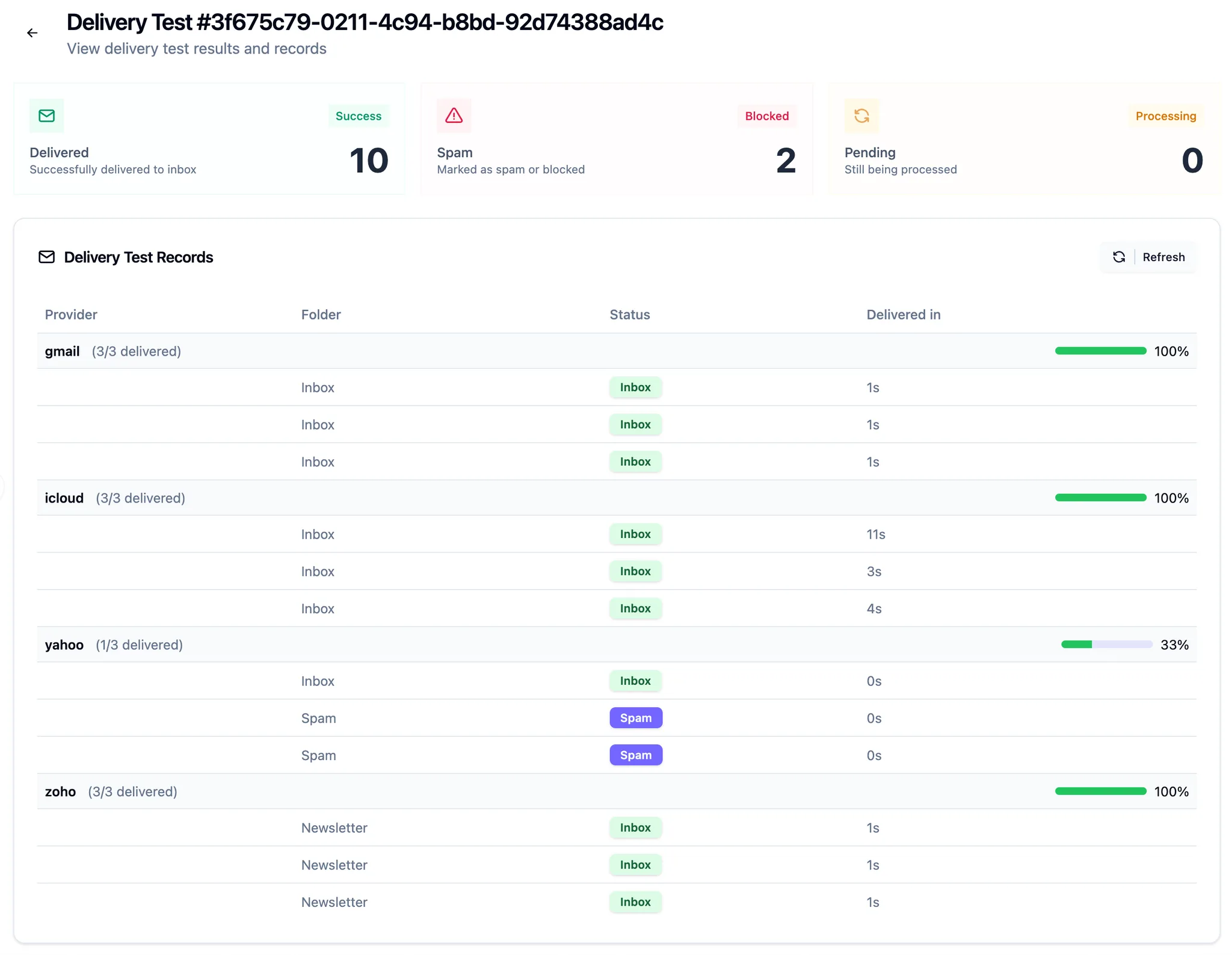
The top of the page is the headline: how many copies were delivered to the inbox, how many were marked as spam or blocked, and how many are still pending. Below it, results are grouped by provider with an inbox rate for each.
Each row shows three things:
Folder — where the message was actually filed. Inbox and Spam are the obvious ones. Providers that sort mail into tabs, such as a newsletter or promotions tab, report that tab by name, and it counts as delivered. A promotions tab is not the inbox some senders wish for, but it is not spam either, and knowing which one you got is the difference between a copy problem and a reputation problem.
Status — the verdict for that copy. Inbox in green, spam in purple, and blocked when the provider refused the message entirely rather than accepting and filing it.
Delivered in — seconds from send to arrival. Most providers file mail within a second or two. A copy that takes ten seconds or more is often being held for extra scanning, which is itself a signal that the filter wasn't sure about it.
In the test above, Gmail, iCloud and Zoho took every copy to the inbox, while Yahoo put two of three in spam. That is a Yahoo-specific problem, and it is worth knowing before the send rather than reading it off a complaint-rate chart next week.
What to do with a bad result
A test that comes back with spam verdicts is a chance to fix something before it costs you. The usual suspects, roughly in order:
- Authentication. Check that SPF, DKIM and DMARC pass for the exact from-domain in the test. A subdomain or a new sending domain that hasn't been aligned is the most common cause of a sudden spam verdict at one provider.
- Content. Change one thing and rerun. Swap the subject line, remove a link shortener, drop an image-only layout. Because a test takes seconds, you can afford to iterate.
- Reputation. If the same message lands fine from one domain and in spam from another, the content isn't the problem. Look at the domain's history in Postmaster Tools, SNDS and the DMARC reports, all of which are in the dashboard next to the tester.
Then rerun the test and confirm the fix worked before sending to your list.
When to run one
- Before any large send. Especially a campaign that differs from your usual traffic in subject, template, or link domains.
- After a change to sending infrastructure. New domain, new DKIM key, new tracking domain, new template engine.
- On a schedule. A weekly test of your standard transactional and marketing templates gives you a baseline, so that when a result changes you know it changed.
- When a customer says "it went to spam." Reproduce it with the same message instead of guessing.
Available now
The deliverability tester is available to every Laneful organization from the dashboard. Pick the message, run the test, and read the verdicts. There is no seed list to build and no mailboxes to maintain — Laneful keeps the accounts, and you keep the results.